

Gemini Omni 1.2 Flash Omni 1.2 Flash Video Generator
Google's Gemini Omni 1.2 video model: 3–15 s clips with sound, from 360p drafts to 4K.
Gemini Omni 1.2 Flash is Google's newest Omni Flash video model, released November 5, 2026. Make 3 to 15 second clips with sound from text, a photo or up to 6 reference images, start with a cheap 360p draft and go up to 4K. You can also add an end frame, change an uploaded clip with words, or extend one by 3 to 10 seconds. No API key needed. Below: what changed from 1.1, and when 1.1 is still cheaper.

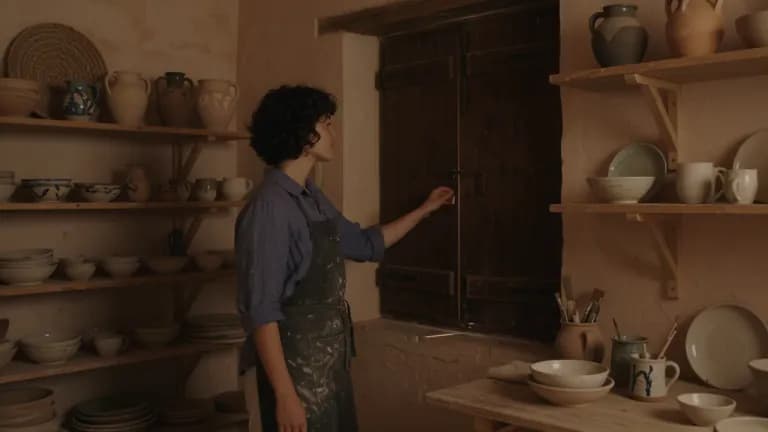
Cinematic travel editorial film following a young ceramic artist opening her seaside workshop at sunrise. She has short curly dark hair, freckles and a relaxed, thoughtful expression. She wears a faded indigo linen shirt with rolled sleeves, cream trousers and a clay-stained canvas apron. The workshop sits inside a weathered Mediterranean building: pale peach plaster walls, arched windows, wooden shelves filled with handmade bowls, a pottery wheel and a small courtyard overlooking the sea. Morning sunlight streams through the windows, catching suspended dust and illuminating the translucent edges of unfinished porcelain. A restrained palette of terracotta, indigo, warm ivory and sea green. Tactile details: wet clay, woven linen, chipped paint and rippling water. Camera movement is quiet and deliberate, alternating intimate 85mm close-ups with wider 35mm environmental compositions. Shallow depth of field for hands and objects, deeper focus when revealing the workshop. Warm natural highlights, soft blue shadows, subtle film grain and gentle highlight bloom. Movements feel observed rather than performed. Maintain the same artist, wardrobe, pottery and workshop throughout. No dialogue, text or logos. An independent craft magazine brought to life. Shot-by-shot beat sheet — five sequential beats, compressed to fit the selected clip duration: 1. OPENING THE WORKSHOP From inside the dim workshop, the camera slowly pushes toward a closed wooden shutter. The artist opens it, letting golden sunlight sweep across the room. She pauses with one hand on the frame, looking toward the sea. Medium-wide composition, soft backlight outlining her curls. 2. PREPARING THE CLAY Close-up of her hands pressing a lump of wet clay onto the pottery wheel. Her fingers leave distinct impressions before smoothing the surface. A slow lateral camera slide reveals a shallow bowl of cloudy water and a folded linen cloth beside the wheel. 3. SHAPING THE VESSEL Three-quarter view as she leans forward and draws the spinning clay into a small rounded vessel. The camera makes a gentle partial orbit, keeping her hands and the vessel in focus. The shape changes gradually and continuously under her fingertips. 4. INSPECTING THE FINISH She lifts a finished sea-green ceramic cup toward the window and slowly turns it, examining its uneven handmade rim. Tight close-up: sunlight travels across the glaze, revealing tiny variations in color. Her softly blurred face remains behind the cup. 5. THE FIRST QUIET MOMENT In the courtyard, she sets the cup on a worn stone table and sits beside it. A breeze moves her shirt sleeve and the leaves of a nearby olive tree. The camera slowly pulls back through the doorway, framing her against the morning sea. Hold the final composition for a quiet beat.
Omni 1.2 Flash examples
 Gemini Omni 1.1 Flash
A fishing harbor at dawn. The camera glides low over calm water toward small wooden boats as gulls lift off a pier and the sun breaks through mist. Gentle lapping water and distant gull calls, no music, no dialogue.
 MiniMax H3 Max
Official sample
A white kitten chases a butterfly across a sunlit garden. Gentle camera tracking, natural movement, soft afternoon light filtering through the leaves.
 Wan 3.0
Official sample
A lighthouse beam sweeps through heavy rain over black rocks at night, waves detonating against the cliff.
 Kling 4.0
Official sample
A fisherman in a yellow raincoat rows a small wooden boat across a calm misty lake at dawn, soft golden light breaking through the fog, gentle ripples, a heron lifts off in the background, slow cinematic dolly-in, natural ambient sound of water and distant birds
 Gemini Omni 1.1 Flash
Vertical close-up: a barista pours steamed milk into an espresso cup and a heart of latte art forms on the surface. Warm cafe light, steam rising, shallow focus. Soft cafe ambience and the hiss of the milk, no dialogue.
 MiniMax H3 Max
Official sample
An aging warrior-monk in scorched ceremonial armor, a split ceramic mask and a humming prayer-band on his forearm + 0–4s: climbs silently along a cliffside terrace as insect-like surveyor drones comb the sun-bleached ruins, standing alone under as the camera rises over the ruined monastery. Sun-blasted post-apocalyptic sci-fi action, dust, heat haze, practical debris, sweeping crane tracking, silence broken only by wind.
 Wan 3.0
Official sample
ENVIRONMENT: open coastal air — pale blue and violet sky with dry scumbled clouds, a thin band of teal sea at the lower edge, warm cream haze along the horizon. Backlight from behind the flower mass makes the petals glow near-white while her face and arms fall into warm shadow. STYLE: 24fps, gentle handheld drift, no camera shake spikes. Slow continuous push-in of about 8%, drifting a few degrees to the right so her face rotates marginally into the light. Shallow parallax between three planes: foreground drifting petals, mid-plane figure and bouquet, background sky and sea. Color tone: cool blue-lilac against cream-gold and umber. No morphing, no smoothing, no plastic skin, no added detail beyond the painting's own resolution.
 Kling 4.0
Official sample
A young royal chef stands inside a huge medieval castle kitchen, wearing a cream tunic and dark leather apron while dozens of elaborate dishes cover a long wooden table. A small dragon suddenly pushes its head through an open stone window. Everyone in the kitchen freezes. The chef cautiously offers it a roasted chicken. The dragon ignores it completely. He nervously raises a tiny fruit tart instead. The dragon’s eyes immediately brighten and it gently reaches toward the dessert. The camera begins behind hanging copper pans, tracks toward the chef, then pushes past him toward the dragon outside the window. Playful Western fantasy, detailed medieval kitchen, expressive creature behavior, cinematic comedy, realistic food and firelight.
 MiniMax H3 Max
Official sample
Create a 5-second live-action Hollywood film shot in a bright university library. A thoughtful professor stands in a medium shot, turns slightly toward an unseen student, and calmly says, “What is the real?” Natural daylight, professional cinema camera, realistic performance, subtle camera drift, no close-up, no dark lighting, perfect lip sync.
 Wan 3.0
Official sample
A lone astronaut walks through the ruins of a once-busy city, surrounded by abandoned cars, overgrown skyscrapers, and trees growing through cracked streets. She discovers a small child standing inside an old convenience store, holding a glowing flower. The astronaut slowly removes her helmet as birds suddenly rise into the sky and sunlight breaks through the clouds. Emotional science-fiction film, grand post-apocalyptic environment, slow cinematic camera movement, wide establishing shots, intimate facial close-ups, realistic dust particles, warm sunlight contrasting with cold ruins, epic yet hopeful atmosphere.
 MiniMax H3 Max
Official sample
Exactly 5 seconds. Inside a bright sterile laboratory, a cryogenic chamber opens and cold vapor spills across the floor. A confused man slowly sits up. A scientist steps forward and says, “Welcome back.” The man asks, “What year is it?” The scientist hesitates as the camera gently pulls backward. Photorealistic Hollywood science-fiction drama, soft white daylight, realistic vapor, restrained acting, accurate lip sync, no extreme close-up.
 Wan 3.0
Official sample
A young female piano tuner works alone inside an empty concert rehearsal hall, carefully adjusting the strings of a grand piano. A handsome young man enters from the opposite side carrying another tuning kit. They both stop when they realize they have been hired for the same piano. Without speaking, they sit on opposite sides and each plays a single note. She adjusts one string. He answers with another note. Their awkward disagreement slowly turns into an improvised musical conversation. The camera begins with a wide composition across the empty hall, glides toward the piano, then moves between their hands and subtle expressions. Romantic musical comedy, natural chemistry, elegant concert-hall acoustics, cinematic warm light.
Omni 1.2 Flash vs 1.1: what changed
Both versions are in the model picker on this site. Credit prices are this site's; the generator shows the exact cost before you run.
| Version | Length | Resolution | First and last frame | Reference images | Edit a clip | Extend a clip | Shortest clip | 8 seconds at 720p | 8 seconds at 1080p |
|---|---|---|---|---|---|---|---|---|---|
| Omni 1.1 Flash | 4, 6, 8 or 10 seconds | 720p, 1080p or 4K | Yes, 4 to 10 seconds | Up to 7 | Clip up to 30 seconds, first 10 used; flat price per run | No | 4 seconds at 720p: 60 credits | 100 credits | 100 credits |
| Omni 1.2 Flash | Any whole second from 3 to 15 | 360p, 720p, 1080p or 4K | Yes, 3 to 10 seconds | Up to 6 | Clip up to 15 seconds; priced by its length | Yes, 3 to 10 new seconds | 3 seconds at 360p: 18 credits | 160 credits | 200 credits |
What's new in Gemini Omni 1.2 Flash
Four changes you notice in the generator, and one Google points to in the sound.
Clips from 3 to 15 seconds
Omni 1.1 Flash stopped at 10 seconds and only made even lengths. Omni 1.2 Flash takes any whole second from 3 to 15, so a 3-second loop, a 7-second product shot and a 15-second ad are all one run. With a last frame set, the limit is 10 seconds.
Cheap 360p drafts
A 360p tier is new here. It costs about a third of 720p, which makes it the cheap way to test a prompt, a camera move or a length before you spend on 720p, 1080p or 4K. Google suggests the same habit: draft low, then make the final cut at a higher resolution.
Extend a clip
Upload a clip of any length, write what happens next, and Omni 1.2 Flash adds 3 to 10 seconds that pick up from its last 10. You pay only for the new seconds. It has its own page: the AI video extender.
Clearer dialogue, Google says
Google says 1.2 gives more natural dialogue, clearer lip-sync and better handling of several speakers in one shot. We have not measured it, so treat it as Google's claim and judge it on your own clips; the section below shows how to write speech into a prompt.
Three clips made with Omni 1.2 Flash
Three clips from the model provider's own gallery, one for each way to start. Open the generator examples to load the same prompt.
From a written scene
A long prompt described a ceramic artist opening her seaside workshop at sunrise: her hair, clothes, the peach plaster walls and the light. The 10-second clip at 720p keeps those details as the camera moves around her hands on the wheel.
From one photo
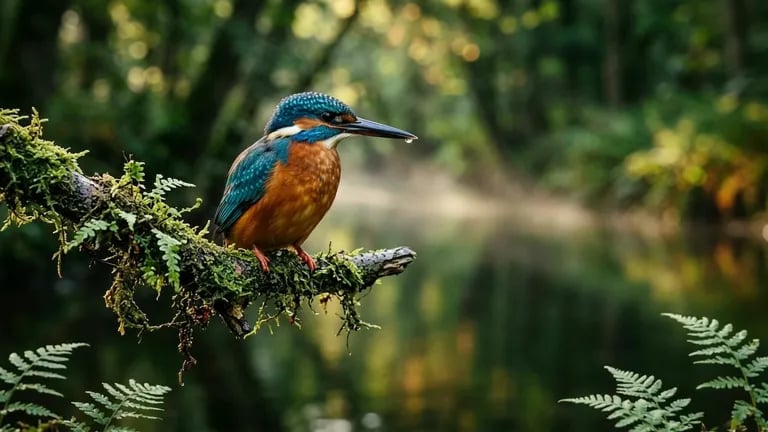
A still of a kingfisher on a mossy branch became a 5-second shot: the bird breathes, turns its head toward the stream, and a droplet falls from its beak while the camera pushes in slowly. The prompt asked for one continuous shot, and the clip keeps the bird's colors from the photo.
From three reference images
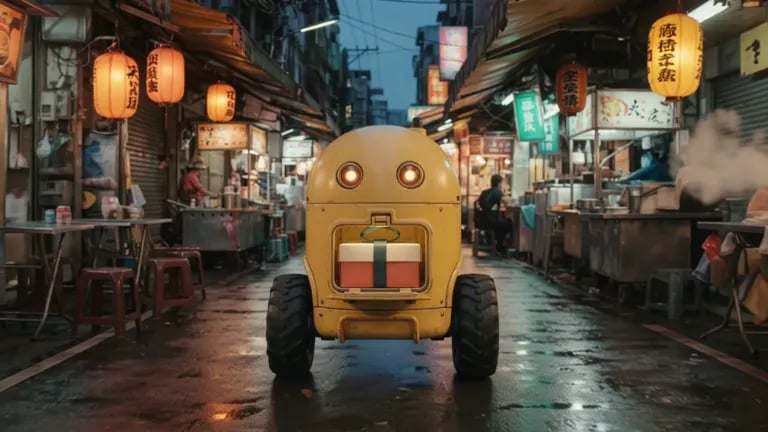
One image of a yellow delivery robot, one of a night market and one of a takeaway box went in. The 8-second clip puts the robot in that market with the box in its cargo hold, rolling over wet pavement under the lanterns.
Omni 1.1 Flash or 1.2 Flash: which to pick
Pick by length and budget. Both are in the same model picker.
Pick Omni 1.2 Flash when you need something 1.1 cannot do: a clip shorter than 4 seconds or longer than 10, a cheap 360p draft, an odd length such as 7 seconds, or a continuation of a clip you already have. It is also the default on every tool here.
Pick Omni 1.1 Flash when you want a 4 to 10 second clip at 720p or 1080p and the lowest price: for those lengths it costs less than 1.2, as the table above shows, and it charges the same for 1080p as for 720p. It also takes one more reference image (7 instead of 6) and edits longer uploads.
One thing to know: Google says that from December 3, 2026 it sends every request for Omni 1.1 Flash to 1.2. We will update the picker and this page if that changes what 1.1 means here.
Gemini Omni 1.2 Flash pricing
Credits per second of video, with sound included. The same rates apply to text, photo and reference clips, to edits (by the length of your clip) and to extensions (by the new seconds).
- 360p
- 6 credits a second
- 3 seconds: 18 credits; 15 seconds: 90
- 720p
- 20 credits a second
- 8 seconds: 160 credits; 15 seconds: 300
- 1080p
- 25 credits a second
- Upscaled by the model; 8 seconds: 200 credits
- 4K
- 50 credits a second
- Upscaled by the model; 8 seconds: 400 credits
Writing dialogue and sound for Omni 1.2 Flash
Every clip comes with sound. Say what you want to hear.
Omni 1.2 Flash makes the sound together with the picture, so the prompt is where you direct it. Name the ambience ("rain on a tin roof", "a busy café"), the effects ("the door slams"), and whether you want music. If you want quiet, say "no music" or "no dialogue".
For speech, put the exact words in quotes and say who speaks: "The chef looks at the camera and says: 'Tonight we start with the sauce.'" With two people, describe them clearly and give each their own line in order, such as "The older man asks: 'Ready?' The girl answers: 'Always.'" Keep each line short, since a 15-second clip only holds a few sentences.
For a clip you will edit later, it helps to keep the sound simple at first. You can add or change it in a follow-up edit by describing the new sound.
Every way to start with Omni 1.2 Flash
Text to video
Write the scene, the camera and the sound.
Image to video
Upload a photo and say what should move.
Reference to video
Add up to 6 images of a character, product or style.
Frames to video
Set the first and last frame, up to 10 seconds.
AI video extender
Add 3 to 10 seconds to a clip you already have.
Gemini Omni 1.2 Flash questions
The model is Google's Gemini Omni 1.2 Flash. Omni Flash 2 is an independent site, not made by Google, that runs the model in your browser and charges per clip. Google also offers it in the Gemini app, Google Flow, Google Vids and the Gemini API.
Yes. Pick it in the model picker in any generator on this site. Google has said that from December 3, 2026 it routes Omni 1.1 Flash requests to 1.2, so 1.1 may behave like 1.2 after that date.
No. A new account gets 10 free credits, which is less than the shortest clip, a 3-second 360p draft at 18 credits. Videos use credits from a plan or credit pack, and the generator shows the cost before you run it.
Not yet on this site. Google and our provider describe different limits for reference clips, so for now Omni 1.2 Flash here takes up to 6 reference images, a first and last frame, or a clip to edit or extend.
It depends on the length, the resolution and how busy the model is. Short 360p and 720p clips are the quickest. The clip appears in the generator when it is ready, and you can leave the page and find it later in your library.
Google adds an invisible SynthID watermark to every Gemini Omni 1.2 Flash video, which tools can detect but you cannot see.
Yes, after your first purchase. Open "Developer API" in the footer to create a key, or "Use in your AI" to connect ChatGPT or Claude. Text to video and image to video work there at the same credit price as on this site.
Try Gemini Omni 1.2 Flash now
Start with a 360p draft, then make the final cut in 720p, 1080p or 4K.